DataFrame 與其方法

給試算表使用者的 Python

Chris Cardillo

Data Scientist

接續上次進度
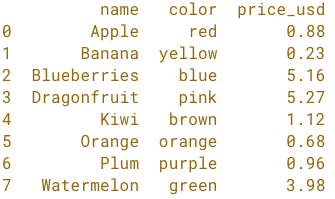
import pandas as pd

fruit = pd.read_excel('fruit.xlsx')

print(fruit)

簡單水果完整資料集.png

給試算表使用者的 Python

pandas DataFrame 結構

簡單水果完整資料集.png

給試算表使用者的 Python

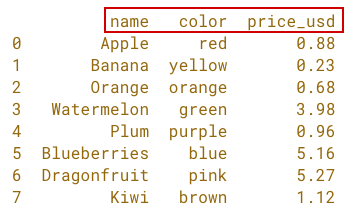
pandas DataFrame 結構

簡單水果 df 欄.png

給試算表使用者的 Python

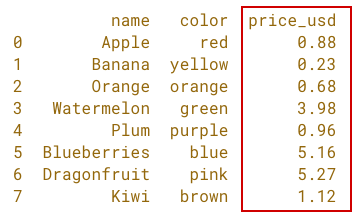
pandas DataFrame 結構

簡單水果 df 數值欄.png

給試算表使用者的 Python

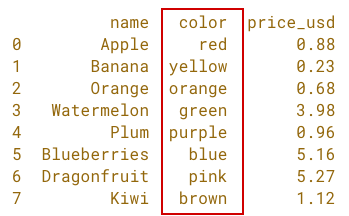
pandas DataFrame 結構

簡單水果 df 文字欄.png

給試算表使用者的 Python

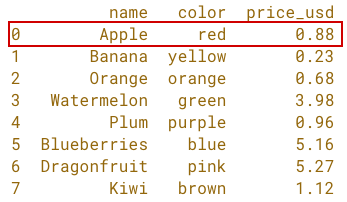
pandas DataFrame 結構

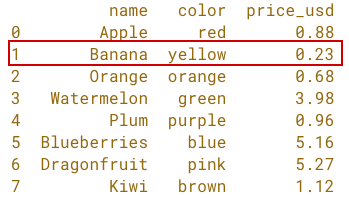
簡單水果 df 列 1.png

給試算表使用者的 Python

pandas DataFrame 結構

簡單水果 df 列 2.png

給試算表使用者的 Python

pandas DataFrame 結構

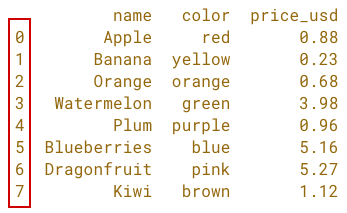
簡單水果 df 索引.png

給試算表使用者的 Python

DataFrame 方法

  • .head()
  • .info()
  • .describe()
  • .sort_values()
給試算表使用者的 Python

.head() 方法

import pandas as pd

fruit = pd.read_excel('fruit.xlsx')

print(fruit.head())

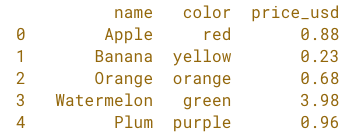
簡單水果 df head.png

給試算表使用者的 Python

.head() 方法

import pandas as pd

fruit = pd.read_excel('fruit.xlsx')

print(fruit.head(2))

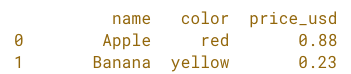
簡單水果 df head 帶參數.png

給試算表使用者的 Python

.info() 方法

import pandas as pd

fruit = pd.read_excel('fruit.xlsx')

print(fruit.info())
<class 'pandas.core.frame.DataFrame'>
RangeIndex: 8 entries, 0 to 7
Data columns (total 3 columns):
 #   Column     Non-Null Count  Dtype  
 --  ------     --------------  -----  
 0   name       8 non-null      object 
 1   color      8 non-null      object 
 2   price_usd  8 non-null      float64
dtypes: float64(1), object(2)
memory usage: 272.0+ bytes
給試算表使用者的 Python

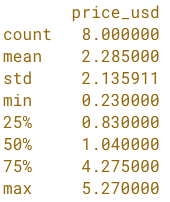
.describe() 方法

import pandas as pd

fruit = pd.read_excel('fruit.xlsx')

print(fruit.describe())

簡單水果 df describe 方法.png

給試算表使用者的 Python

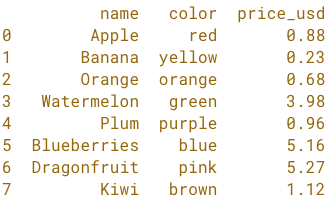
.sort_values() 方法

import pandas as pd

fruit = pd.read_excel('fruit.xlsx')

fruit = fruit.sort_values('name')
fruit = fruit.reset_index(drop=True)

print(fruit)

簡單水果 df 依名稱升冪排序.png

給試算表使用者的 Python

.sort_values() 方法

import pandas as pd

fruit = pd.read_excel('fruit.xlsx')

fruit = fruit.sort_values('price_usd', ascending=False)
fruit = fruit.reset_index(drop=True)

print(fruit.head(3))
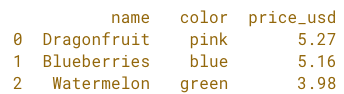
簡單水果 df 依價格降冪排序取前 3.png

給試算表使用者的 Python

換你動手!

給試算表使用者的 Python

Preparing Video For Download...