使用 PySpark 進行特徵工程
John Hogue
Lead Data Scientist, General Mills
df.select(['NO', 'UNITNUMBER', 'CLASS']).show()
+----+----------+-----+
|  NO|UNITNUMBER|CLASS|
+----+----------+-----+
|   1|      null|   SF|
| 156|        A8|   SF|
| 157|       207|   SF|
| 158|      701G|   SF|
| 159|        36|   SF|
有多個欄位對分析不需使用
'NO'
'UNITNUMBER'
'CLASS'
drop(*cols)
*cols
# 要刪除的欄位清單
cols_to_drop = ['NO', 'UNITNUMBER', 'CLASS']

# 刪除欄位
df = df.drop(*cols_to_drop)
# 要刪除的欄位清單 cols_to_drop = ['NO', 'UNITNUMBER', 'CLASS']
# 刪除欄位 df = df.drop(*cols_to_drop)
where(condition)
types.BooleanType
like(other)
~
df = df.where(~df['POTENTIALSHORTSALE'].like('Not Disclosed'))
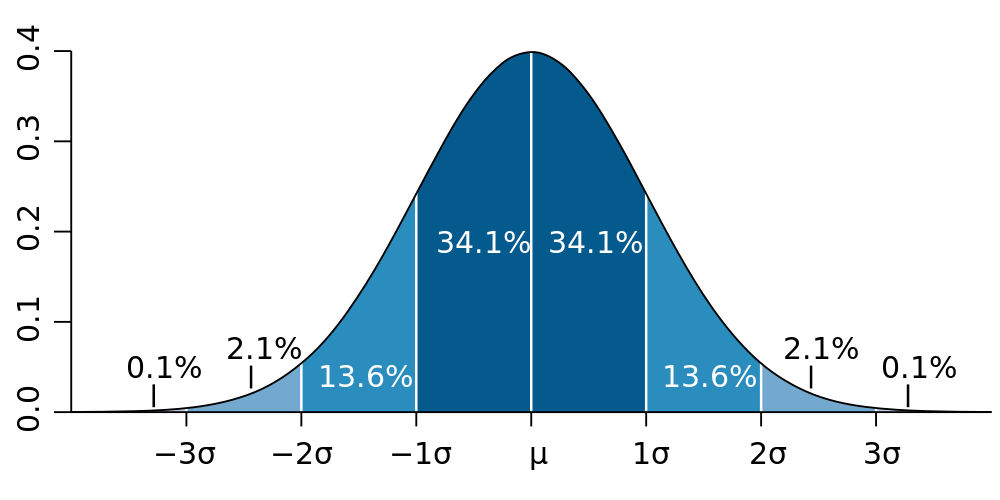
將資料篩到平均(μ)± 3 個標準差(3σ)內
# 計算用於篩選的數值
std_val = df.agg({'SALESCLOSEPRICE': 'stddev'}).collect()[0][0]
mean_val = df.agg({'SALESCLOSEPRICE': 'mean'}).collect()[0][0]

# 建立三個標準差(μ ± 3σ)的上下界
hi_bound = mean_val + (3 * std_val)
low_bound = mean_val - (3 * std_val)

# 使用 where() 篩出介於上下界之間的資料
df = df.where((df['LISTPRICE'] < hi_bound) & (df['LISTPRICE'] > low_bound))
# 計算用於篩選的數值 std_val = df.agg({'SALESCLOSEPRICE': 'stddev'}).collect()[0][0] mean_val = df.agg({'SALESCLOSEPRICE': 'mean'}).collect()[0][0]
# 建立三個標準差(μ ± 3σ)的上下界 hi_bound = mean_val + (3 * std_val) low_bound = mean_val - (3 * std_val)
# 使用 where() 篩出介於上下界之間的資料 df = df.where((df['LISTPRICE'] < hi_bound) & (df['LISTPRICE'] > low_bound))
DataFrame.dropna()
how
thresh
subset
# 刪除任何含 NULL 的列
df = df.dropna()

# 若 LISTPRICE 與 SALESCLOSEPRICE 皆為 NULL 則刪除
df = df.dropna(how='all', subset['LISTPRICE', 'SALESCLOSEPRICE '])

# 至少有兩個欄位為 NULL 時刪除
df = df.dropna(thresh=2)
# 刪除任何含 NULL 的列 df = df.dropna()
# 若 LISTPRICE 與 SALESCLOSEPRICE 皆為 NULL 則刪除 df = df.dropna(how='all', subset['LISTPRICE', 'SALESCLOSEPRICE '])
# 至少有兩個欄位為 NULL 時刪除 df = df.dropna(thresh=2)
什麼是重複?
dropDuplicates()
# 針對整個 DataFrame
df.dropDuplicates()

# 僅檢查特定欄位清單
df.dropDuplicates(['streetaddress'])
# 針對整個 DataFrame df.dropDuplicates()
# 僅檢查特定欄位清單 df.dropDuplicates(['streetaddress'])