時間特徵

使用 PySpark 進行特徵工程

John Hogue

Lead Data Scientist, General Mills

萬物皆循環

時間圖示

使用 PySpark 進行特徵工程

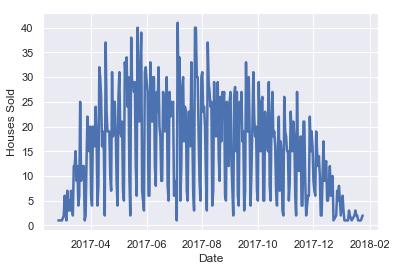
選對時間粒度

每日銷售

使用 PySpark 進行特徵工程

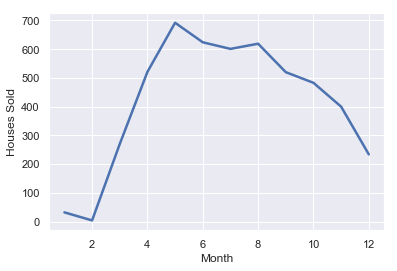
選對時間粒度

每月銷售

使用 PySpark 進行特徵工程

把日期欄位當日期處理…

from pyspark.sql.functions import to_date

# Cast the data type to Date
df = df.withColumn('LISTDATE', to_date('LISTDATE'))
# Inspect the field
df[['LISTDATE']].show(2)
+----------+
|  LISTDATE|
+----------+
|2017-07-14|
|2017-10-08|
+----------+
only showing top 2 rows
使用 PySpark 進行特徵工程

時間組成要素

from pyspark.sql.functions import year, month

# Create a new column of year number
df = df.withColumn('LIST_YEAR', year('LISTDATE'))
# Create a new column of month number
df = df.withColumn('LIST_MONTH', month('LISTDATE'))
from pyspark.sql.functions import dayofmonth, weekofyear

# Create new columns of the day number within the month
df = df.withColumn('LIST_DAYOFMONTH', dayofmonth('LISTDATE'))
# Create new columns of the week number within the year
df = df.withColumn('LIST_WEEKOFYEAR', weekofyear('LISTDATE'))
使用 PySpark 進行特徵工程

基本時間指標

上市天數圖

from pyspark.sql.functions import datediff

# Calculate difference between two date fields
df.withColumn('DAYSONMARKET', datediff('OFFMARKETDATE', 'LISTDATE'))
使用 PySpark 進行特徵工程

落後特徵(Lagging Features)

咖啡滴入杯中

window()

根據一組紀錄回傳一筆紀錄

lag(col, count=1)

回傳當前列之前偏移數列的值

使用 PySpark 進行特徵工程

用 PySpark 實作落後特徵

from pyspark.sql.functions import lag
from pyspark.sql.window import Window

# Create Window w = Window().orderBy(m_df['DATE'])
# Create lagged column m_df = m_df.withColumn('MORTGAGE-1wk', lag('MORTGAGE', count=1).over(w))
# Inspect results m_df.show(3)
+----------+------------+----------------+
|      DATE|    MORTGAGE|    MORTGAGE-1wk|
+----------+------------+----------------+
|2013-10-10|        4.23|            null|
|2013-10-17|        4.28|            4.23|
|2013-10-24|        4.13|            4.28|
+----------+------------+----------------+
only showing top 3 rows
使用 PySpark 進行特徵工程

該是練習的 TIME!

使用 PySpark 進行特徵工程

Preparing Video For Download...