ExpressionSet 類別

使用 R 中的 limma 進行差異表達分析

John Blischak

Instructor

資料管理如履薄冰

x_sub <- x[1000, 1:10]
f_sub <- f[1000, ]
p_sub <- p[1:10, ]

一個逗號放錯,就會變成除錯惡夢:

x_sub <- x[1000, 1:10]
f_sub <- f[1000, ]
p_sub <- p[, 1:10]
# Oh no!   *
使用 R 中的 limma 進行差異表達分析

使用 Bioconductor 類別的物件導向程式設計

  • class - 定義承載複雜資料的結構

  • object - 類別的具體實例

  • methods - 作用於特定類別的函式

    • getters/accessors - 取得物件中儲存的資料
    • setters/ - 修改物件中儲存的資料
install.packages("BiocManager")
BiocManager::install("Biobase")
使用 R 中的 limma 進行差異表達分析

建立 ExpressionSet 物件

# Load package
library(Biobase)

# Create ExpressionSet object
eset <- ExpressionSet(assayData = x,
                      phenoData = AnnotatedDataFrame(p),
                      featureData = AnnotatedDataFrame(f))

# View the number of features (rows) and samples (columns) dim(eset)
Features  Samples 
   22283      344
?ExpressionSet
使用 R 中的 limma 進行差異表達分析

從 ExpressionSet 物件存取資料

表現矩陣

x <- exprs(eset)

特徵資料

f <- fData(eset)

表現型資料

p <- pData(eset)
使用 R 中的 limma 進行差異表達分析

篩選 ExpressionSet 物件

  • 用 3 個獨立物件篩選:
x_sub <- x[1000, 1:10]
f_sub <- f[1000, ]
p_sub <- p[1:10, ]
  • 用一個 ExpressionSet 物件篩選:
eset_sub <- eset[1000, 1:10]
nrow(exprs(eset_sub)) == nrow(fData(eset_sub))
TRUE
ncol(exprs(eset_sub)) == nrow(pData(eset_sub))
TRUE
使用 R 中的 limma 進行差異表達分析

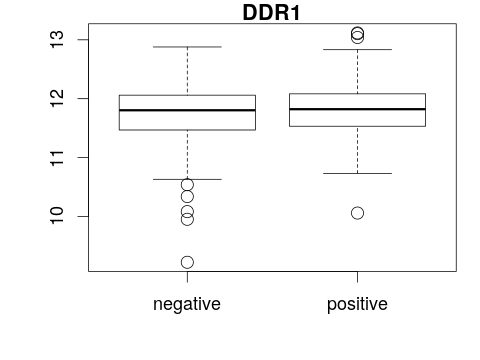
用 ExpressionSet 繪製箱形圖

boxplot(<y-axis> ~ <x-axis>, main = "<title>")
boxplot(<gene expression> ~ <phenotype>, main = "<feature>")

boxplot(exprs(eset)[1, ] ~ pData(eset)[, "er"], main = fData(eset)[1, "symbol"])
使用 R 中的 limma 進行差異表達分析

一起來練習吧!

使用 R 中的 limma 進行差異表達分析

Preparing Video For Download...