總結與編修文字

使用 Python 操作 DeepSeek

James Chapman

AI Curriculum Lead, DataCamp

回顧…

  • 問答(Q&A)
response = client.chat.completions.create(
  model="deepseek-ai/DeepSeek-V4.1-Flash",
  messages=[{"role": "user", "content": "How many days are in October?"}]
)

print(response.choices[0].message.content)
October has **31 days**.  

It's one of the seven months in the Gregorian calendar with 31 days...
使用 Python 操作 DeepSeek

文字編修

  • 範例:更新姓名、代名詞與職稱

$$

prompt = """
Update name to Maarten, pronouns to he/him, and job title to Senior Content Developer
in the following text:

Joanne is a Content Developer at DataCamp. Her favorite programming language is R,
which she uses for her statistical analyses.
"""
使用 Python 操作 DeepSeek

文字編修

response = client.chat.completions.create(
    model="deepseek-ai/DeepSeek-V4.1-Flash",

messages=[{"role": "user", "content": prompt}]
) print(response.choices[0].message.content)
Here's the updated text with the requested changes:

Maarten is a Senior Content Developer at DataCamp. His favorite programming language
is R, which he uses for his statistical analyses.

Let me know if you'd like any further adjustments!
使用 Python 操作 DeepSeek

文字摘要

  • 範例:客服對話紀錄摘要

客服支援團隊

text = """
Customer: Hi, I'm trying to log into 
my account, but it keeps saying 
my password is incorrect. I'm sure 
I'm entering the right one.  

Support: I'm sorry to hear that! 
Have you tried resetting your password?  
...
"""
使用 Python 操作 DeepSeek

文字摘要

prompt = f"""Summarize the customer support chat 
             in three concise key points: {text}"""


response = client.chat.completions.create( model="deepseek-ai/DeepSeek-V4.1-Flash", messages=[{"role": "user", "content": prompt}] ) print(response.choices[0].message.content)
1. **登入問題**:顧客因密碼與未收到重設連結而無法登入。  
2. **建議重設密碼**:支援在確認已寄送後再次補寄重設信。  
3. **即時協助**:顧客改用 Google 登入後問題解決。
使用 Python 操作 DeepSeek

控制回應長度

  • max_tokens = 5
response = client.chat.completions.create(
  model="deepseek-ai/DeepSeek-V4.1-Flash",
  messages=[{"role":"user",
      "content":"Write a haiku about AI."}],
  max_tokens=5
)

**Silent circuits hum
  • max_tokens = 30
response = client.chat.completions.create(
    model="deepseek-ai/DeepSeek-V4.1-Flash",
    messages=[{"role":"user",
      "content":"Write a haiku about AI."}],
    max_tokens=30
)

**Silent circuits hum,**  
**thoughts of light and logic bloom—**  
**minds beyond our own.**
使用 Python 操作 DeepSeek

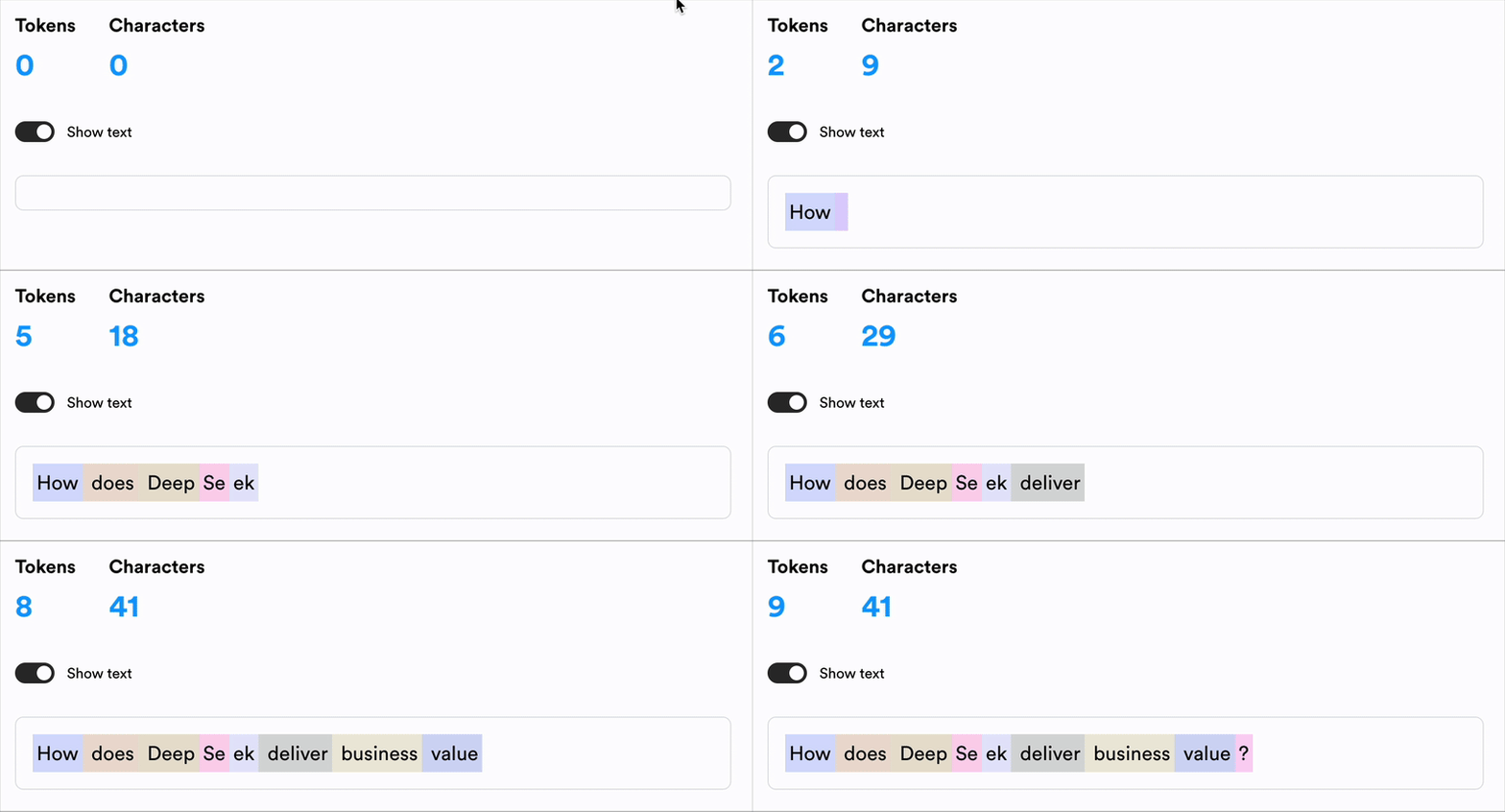
理解 token

$$

  • Token:AI 用來理解與解析文字的基本單位

$$

句子「How can the OpenAI API deliver business value?」中,每個 token 以不同顏色標示。

1 https://lunary.ai/deepseek-tokenizer
使用 Python 操作 DeepSeek

計算成本


  • API 使用成本取決於平台模型token 數量 💰

    • 模型以「成本/token」計價
    • 輸入與輸出 token 可能有不同費率
  • 提高 max_tokens 會增加成本 📈

Screenshot 2025-03-05 at 11.46.54.png

使用 Python 操作 DeepSeek

計算成本

prompt = f"""Summarize the customer support chat 
             in three concise key points: {text}"""

max_tokens = 500

response = client.chat.completions.create(
    model="deepseek-ai/DeepSeek-V4.1-Flash",
    messages=[{"role": "user", "content": prompt}], 
    max_tokens=max_tokens
)
使用 Python 操作 DeepSeek

計算成本

# Define price per token
input_token_price = 2.1 / 1_000_000
output_token_price = 4.4 / 1_000_000

# Extract token usage input_tokens = response.usage.prompt_tokens
output_tokens = max_tokens
# Calculate cost cost = (input_tokens * input_token_price + output_tokens * output_token_price) print(f"Estimated cost: ${cost}")
Estimated cost: $0.0153964
使用 Python 操作 DeepSeek

一起來練習吧!

使用 Python 操作 DeepSeek

Preparing Video For Download...