Dask 陣列

在 Python 中使用 Dask 進行平行程式設計

James Fulton

Climate informatics researcher

陣列分塊

顯示單一整塊的陣列

在 Python 中使用 Dask 進行平行程式設計

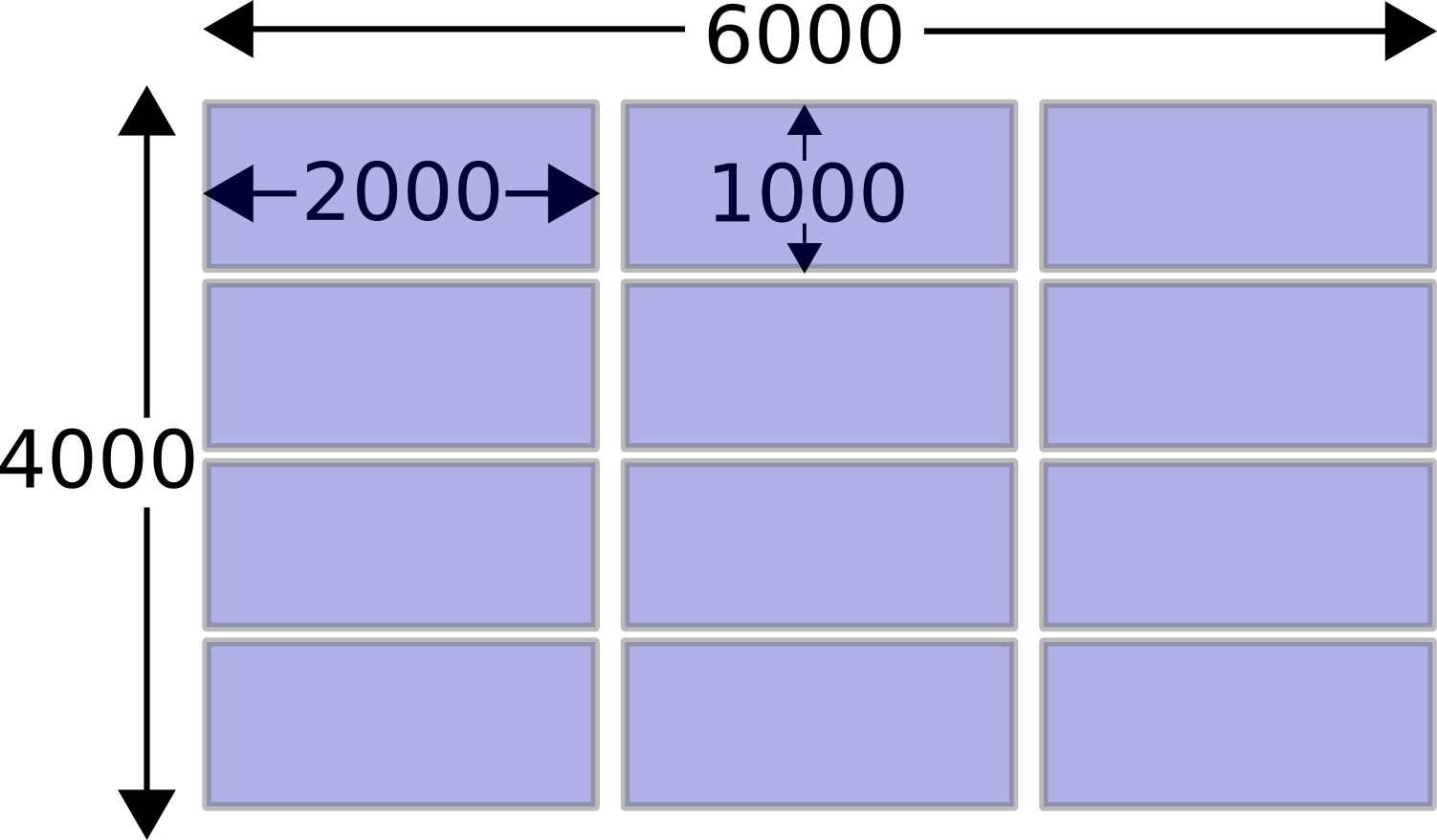
陣列分塊

顯示被拆成多個區塊的陣列

在 Python 中使用 Dask 進行平行程式設計

NumPy vs. Dask 陣列

顯示單一整塊的陣列

import numpy as np

x = np.ones((4000, 6000))
print(x.sum())
24000000.0
  • 執行需時 740 毫秒

顯示被拆成多個區塊的陣列

import dask.array as da

x = da.ones((4000, 6000), chunks=(1000,2000))
print(x.sum().compute())
24000000.0
  • 執行需時 60 毫秒
在 Python 中使用 Dask 進行平行程式設計

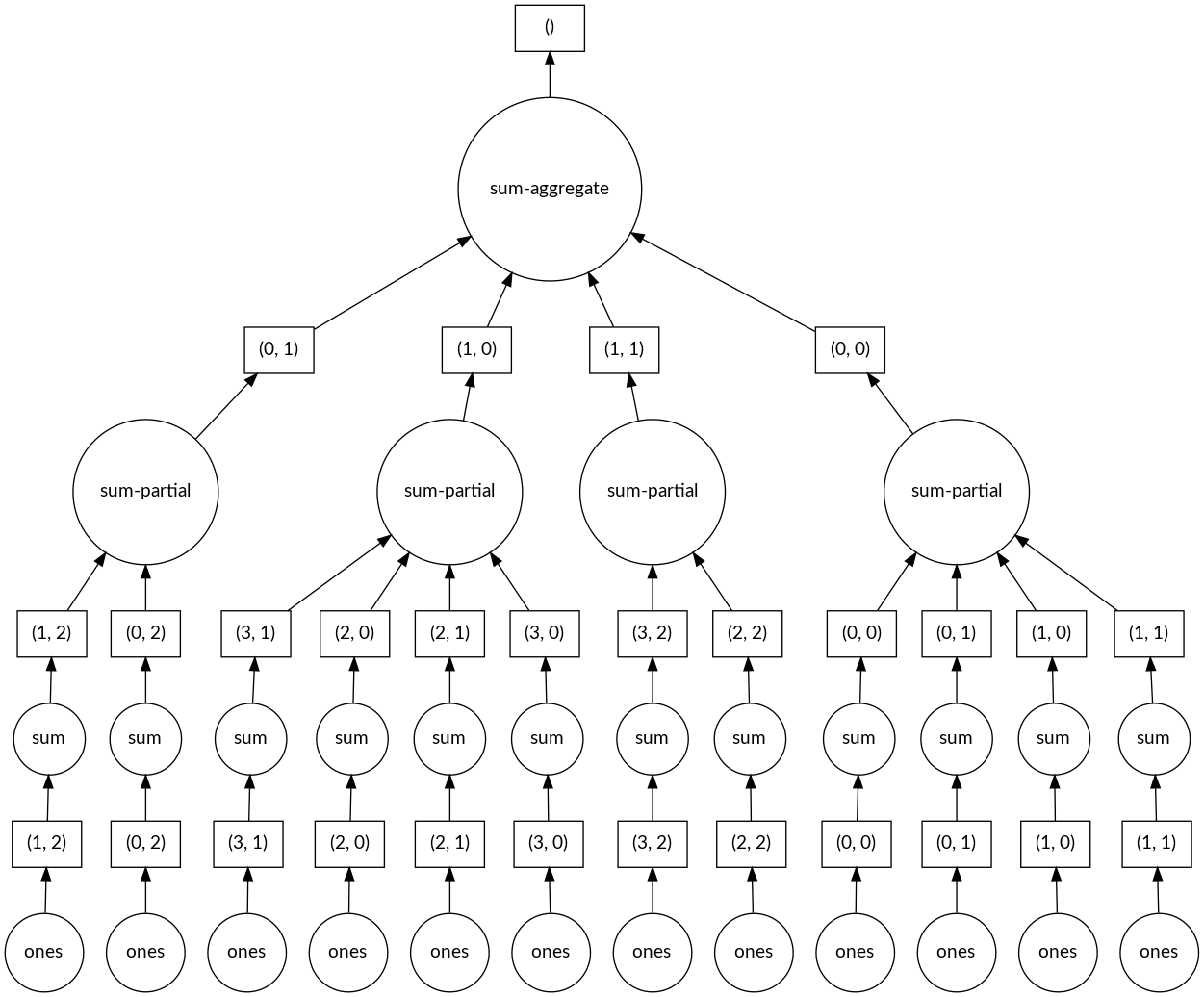
Dask 陣列的任務圖

顯示任務圖的分支會匯聚成最終答案

在 Python 中使用 Dask 進行平行程式設計

Dask 陣列的方法

Dask 陣列幾乎具備 NumPy 陣列的所有方法。

  • x.max()
  • x.min()
  • x.sum()
  • x.mean()
  • 等等。
print(sum_down_columns.compute())
array([1000., 1000., 1000., 1000., 
    1000., 1000., 1000., 1000., 1000.,
    1000.])
在 Python 中使用 Dask 進行平行程式設計

像用 NumPy 一樣用 Dask 陣列

# Lazy mathematics with Dask array
y1 = x**2 + 2*x + 1

# Lazy slicing
y2 = x[:10]

# Applying NumPy functions is lazy too
y3 = np.sin(x)
print(y1)
dask.array<add, shape=(1000, 10), ...
print(y2)
dask.array<getitem, shape=(10, 10), ...
print(y3)
dask.array<sin, shape=(1000, 10), ...
在 Python 中使用 Dask 進行平行程式設計

載入影像陣列

import dask.array as da

import da.image
image_array = da.image.imread('images/*.png')
print(image_array)
dask.array<imread, shape=(40000, 256, 256, 3), dtype=uint8, 
    chunksize=(1, 256, 256, 3), chunktype=numpy.ndarray>
在 Python 中使用 Dask 進行平行程式設計

在區塊上套用自訂函式

def instagram_filter(image):
    ...
    return pretty_image

# Apply function to each image independently pretty_image_array = image_array.map_blocks(instagram_filter)
print(pretty_image_array)
dask.array<instagram_filter, shape=(40000, 256, 256, 3), dtype=uint8, 
    chunksize=(1, 256, 256, 3), chunktype=numpy.ndarray>
在 Python 中使用 Dask 進行平行程式設計

一起來練習吧!

在 Python 中使用 Dask 進行平行程式設計

Preparing Video For Download...