Dense 與 TimeDistributed 層

使用 Keras 進行機器翻譯

Thushan Ganegedara

Data Scientist and Author

Dense 層入門

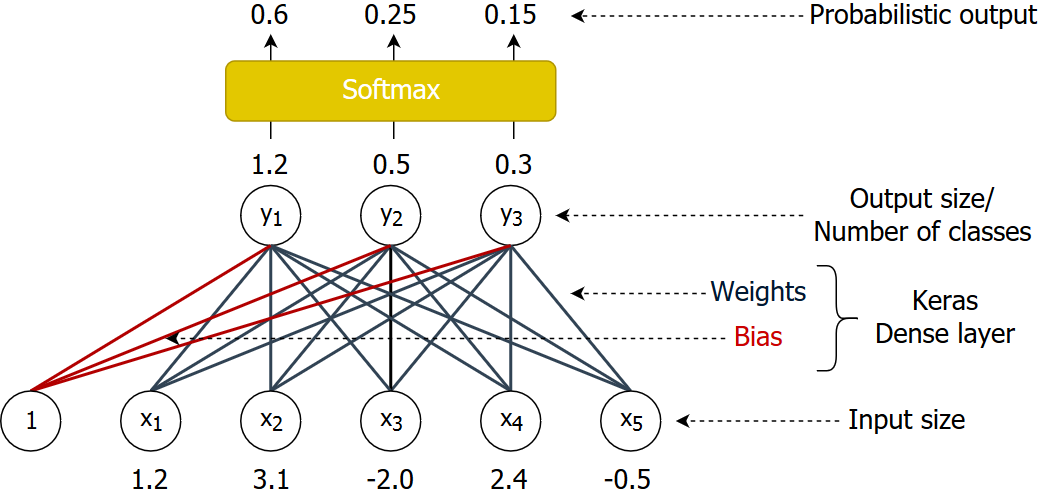
  • 取用輸入向量並轉成機率式預測。
    • y = Weights.x + Bias

權重與偏差

使用 Keras 進行機器翻譯

理解 Dense 層

定義並使用 Dense 層

dense = Dense(3, activation='softmax')
inp = Input(shape=(3,))
pred = dense(inp)
model = Model(inputs=inp, outputs=pred)

使用自訂初始化定義 Dense 層

from tensorflow.keras.initializers import RandomNormal
init = RandomNormal(mean=0.0, stddev=0.05, seed=6000)
dense = Dense(3, activation='softmax', 
             kernel_initializer=init, bias_initializer=init)
使用 Keras 進行機器翻譯

Dense 層的輸入與輸出

  • Dense softmax 層
    • 接受 (batch size, input size) 陣列
      • 例如 x = [[1, 6, 8], [8, 9, 10]] # a 2x3 array
    • 輸出 (batch size, num classes) 陣列
      • 例如 類別數 = 4
      • 例如 y = [[0.1, 0.3, 0.4, 0.2], [0.2, 0.5, 0.1, 0.2]] # a 2x4 array
    • 每個樣本的輸出是各類別上的機率分佈
      • 沿欄方向加總為 1
    • 可用 np.argmax(y, axis=-1) 取得每個樣本的類別
      • 例如 np.argmax(y,axis=-1) 產生 [2,1]
使用 Keras 進行機器翻譯

理解 TimeDistributed 層

  • 讓 Dense 層可處理時間序列輸入
dense_time = TimeDistributed(Dense(3, activation='softmax'))
inp = Input(shape=(2, 3))
pred = dense_time(inp)
model = Model(inputs=inp, outputs=pred)
使用 Keras 進行機器翻譯

TimeDistributed 層的輸入與輸出

  • 接受 (batch size, sequence length, input size) 陣列
x = [[[1, 6], [8, 2], [1, 2]], 
    [[8, 9], [10, 8], [1, 0]]] # a 2x3x2 array
  • 輸出 (batch size, sequence length, num classes) 陣列
    • 例如 類別數 = 3
y = [[[0.1, 0.5, 0.4], [0.8, 0.1, 0.1], [0.6, 0.2, 0.2]], 
     [[0.2, 0.5, 0.3], [0.2, 0.5, 0.3], [0.2, 0.8, 0.0]]] # a 2x3x3 array
  • 每個樣本的輸出是各類別上的機率分佈
  • 可用 np.argmax(y, axis=-1) 取得每個樣本的類別
使用 Keras 進行機器翻譯

沿時間維度切片資料

y = [[[0.1, 0.5, 0.4], [0.8, 0.1, 0.1], [0.6, 0.2, 0.2]], 
     [[0.2, 0.5, 0.3], [0.2, 0.5, 0.3], [0.2, 0.8, 0.0]]] # a 2x3x3 array
classes = np.argmax(y, axis=-1) # a 2 x 3 array

在時間維度上迭代資料

for t in range(3):
  # 取得 y 與 classes 的第 t 個時間切片
  for prob, c in zip(y[:,t,:], classes[:,t]):
     print("Prob: ", prob, ", Class: ", c)
Prob:  [0.1 0.5 0.4] , Class:  1
Prob:  [0.2 0.5 0.3] , Class:  1
Prob:  [0.8 0.1 0.1] , Class:  0
...
使用 Keras 進行機器翻譯

一起來練習吧!

使用 Keras 進行機器翻譯

Preparing Video For Download...