接下來是什麼

Power Apps 入門

Luise Freese

Azure & Power Platform Architect

何時 Dataverse 勝過 SharePoint


  • SharePoint,適合單一清單、小團隊
  • Dataverse,關聯、角色型安全性、可擴充、商業邏輯

$$

只要以上任一項重要,就選 Dataverse。

$$

Microsoft Dataverse 圖示

Power Apps 入門

Power Apps 的 Copilot

$$

$$

Power Apps Copilot 在公式列中的實際畫面截圖


  • 以自然語言提示產生控制項
  • 用淺白英文解釋既有公式
  • 當 App Checker 標記問題時建議修正

$$

將 Copilot 的輸出視為草稿。

Power Apps 入門

模型驅動應用程式


  • 從 Dataverse 資料表自動產生
  • 標準化清單、表單、檢視
  • 為 CRM、案件管理、大量紀錄而生

以側邊列實體清單與自動產生 Dataverse 紀錄格狀檢視呈現的模型驅動應用程式示意圖。

Power Apps 入門

Solutions 與 ALM

將 Solution 從開發環境匯出,並透過測試環境匯入到正式環境的示意圖。


  • Solution 將 app + tables + flows 打包
  • 從 Dev 匯出,匯入到 Test 或 Production
  • 預設環境用於打樣,不是正式上線
Power Apps 入門

AI Builder


  • AI Builder,表單、收據、情緒的預建模型
  • Copilot,在 Studio 產生控制項並解釋公式
  • AI Builder = 結構化資料,Copilot = 製作支援

$$

Microsoft AI Builder 圖示

Power Apps 入門

無障礙基礎

$$

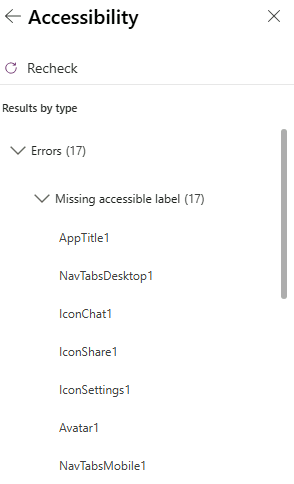
App Checker 的無障礙標籤分頁展開,列出依控制項分組的缺少可存取標籤問題


  • AccessibleLabel,螢幕報讀器會讀的內容
  • 對比,文字與背景的可讀性
  • 定位順序(TabIndex),鍵盤使用者流暢操作
Power Apps 入門

一起來練習吧!

Power Apps 入門

Preparing Video For Download...