Quy trình Explore-Plan-Code

Phát triển phần mềm với Claude Code

Dani Zysman

AI Curriculum Manager @ DataCamp

Vấn đề "Lao vào ngay"

Tảng băng: prompt nổi trên mặt nước, độ phức tạp ẩn bên dưới

Phát triển phần mềm với Claude Code

Quy trình làm việc

Lưu đồ: Init → Explore → Plan → Code

Phát triển phần mềm với Claude Code

Tổng quan dự án API

music-analytics-api/
  app.py           # Application entry point
  routes.py        # API endpoints
  models.py        # Artist/Album models
  analytics.py     # Statistics functions
  middleware.py    # Request logging
  config.py        # Session settings

Một Music Analytics API đơn giản với các mẫu sẵn có cần tuân thủ.

Phát triển phần mềm với Claude Code

CLAUDE.md: Bộ nhớ dự án

CLAUDE.md:

  • Cung cấp ngữ cảnh bền vững về dự án của bạn cho Claude
  • Claude tự động đọc nó ở mỗi phiên
  • Không cần giải thích lại thiết lập mỗi lần
Phát triển phần mềm với Claude Code

Bắt đầu với /init

> /init
Music Analytics API
A Flask-based REST API for music data analytics.

Project Structure
- app.py       Flask application entry point
- routes.py    API endpoint definitions
- analytics.py Statistical analysis functions

Coding Conventions
- Use type hints for function parameters
- Include docstrings for all public functions
- Follow PEP 8 style guidelines
Phát triển phần mềm với Claude Code

Chế độ Plan

  • Chuyển đổi bằng Shift+Tab hoặc gõ /plan
  • Khi có kế hoạch, nhấn Ctrl+G để trực quan hóa, phê duyệt, rà soát hoặc chỉnh sửa
Phát triển phần mềm với Claude Code

Bỏ qua bước lập kế hoạch

> Add a /api/login endpoint that creates a session for a user
from flask import jsonify, request
from flask_login import LoginManager, login_user
from app import app

login_manager = LoginManager(app)
@app.route('/api/login', methods=['POST'])
def login():
    """Handle user login and create session."""
    data = request.get_json()
    user = User.query.filter_by(username=data['username']).first()
    if user and user.password == data['password']:
        login_user(user)
        return jsonify({'status': 'success'})
    return jsonify({'error': 'Invalid credentials'}), 401
Phát triển phần mềm với Claude Code

Lập kế hoạch trước, rồi mới code

> /plan Add a /api/login endpoint that creates a session for a user
Plan: Thêm endpoint POST /api/login

Ngữ cảnh
Music analytics API đã có hạ tầng phiên làm việc
(flask_session, SECRET_KEY, session đã được import trong routes)
nhưng chưa có xác thực.

Tệp cần sửa
- models.py:  thêm lớp User, lớp UserStore, singleton user_store
- routes.py:  mở rộng import, thêm route login

Không cần thay đổi app.py, config.py, middleware.py, hoặc analytics.py.
Phát triển phần mềm với Claude Code

Suy nghĩ mở rộng

> think about how to add authentication to this API
Phát triển phần mềm với Claude Code

Các cấp độ suy nghĩ

Lệnh Mức độ suy luận
think Suy luận cơ bản
think more Suy luận mở rộng
think a lot Suy luận toàn diện
think longer Suy luận với thời gian dài hơn
ultrathink Suy luận tối đa
Phát triển phần mềm với Claude Code

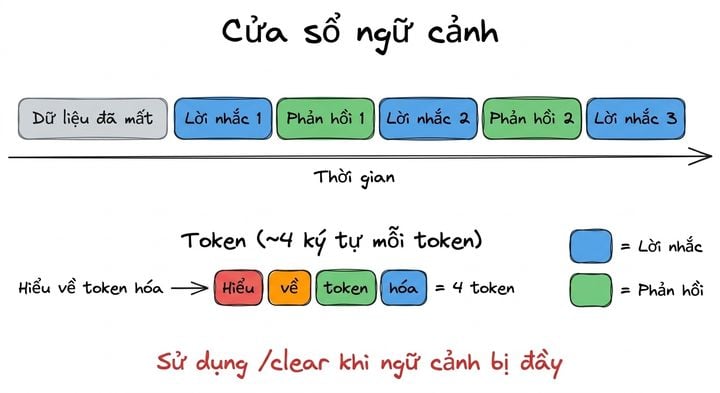
Quản lý Context Window và Tokens

excalidraw: Cửa sổ ngữ cảnh đầy dần với prompt và phản hồi, kèm phân tích token

  • "Context window exceeded" → phiên quá dài, dùng /clear
  • Claude ưu tiên đoạn hội thoại gần đây khi ngữ cảnh đầy
Phát triển phần mềm với Claude Code

Quy trình hoàn chỉnh

Lưu đồ: /init → Explore → Plan → Review → Code → Test

Phát triển phần mềm với Claude Code

Cùng luyện tập nào!

Phát triển phần mềm với Claude Code

Preparing Video For Download...