LLMs for text classification and generation

Introduction to LLMs in Python

Iván Palomares Carrascosa, PhD

Senior Data Science & AI Manager

Loading a pre-trained LLM

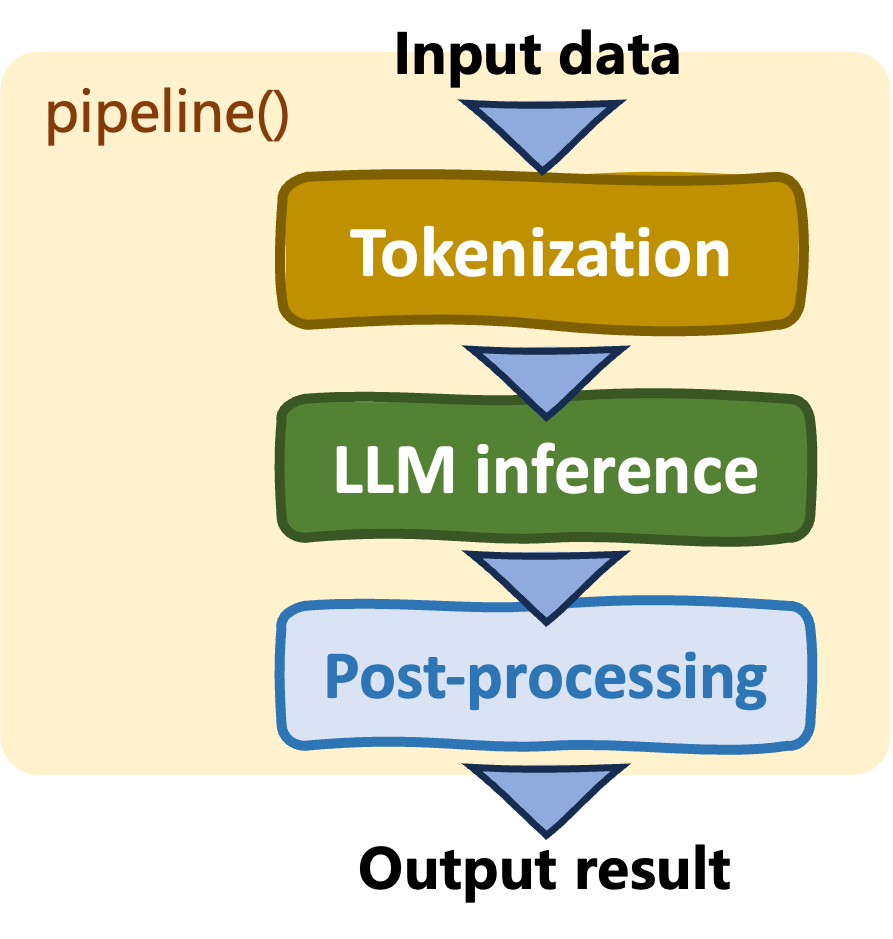
Pipelines: pipeline()

  • Simple, high-level interface
  • Automatic model and tokenizer selection
  • More abstraction = less control
  • Limited task flexibility

Hugging Face Transformers' pipelines

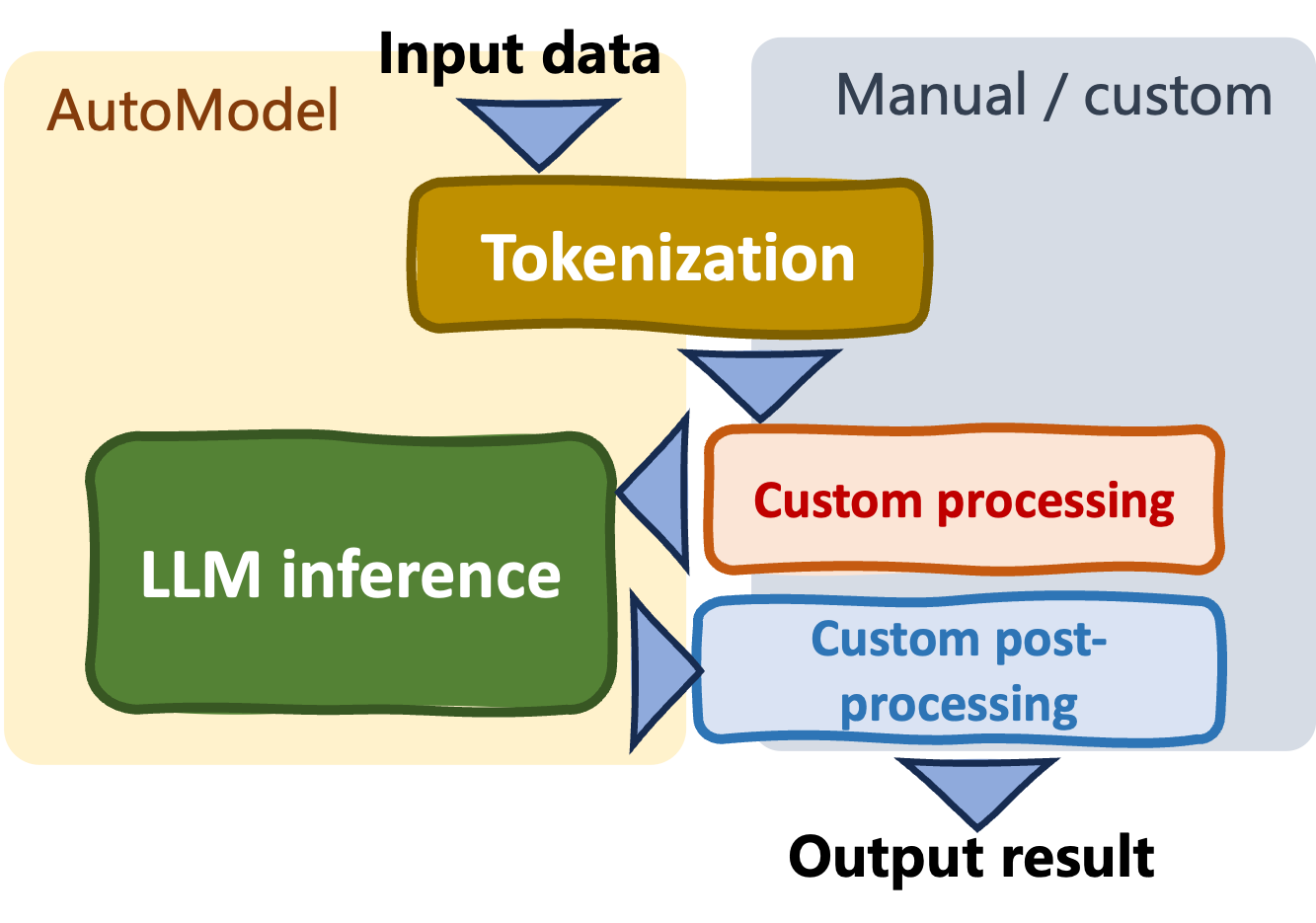
Auto classes (AutoModel class)

  • Flexibility, control and customization
  • Complexity: manual set-ups
  • Support very diverse language tasks
  • Enable model fine-tuning

Hugging Face Transformers' AutoModel class

Introduction to LLMs in Python

The AutoModel and AutoTokenizer classes

import torch.nn as nn
from transformers import AutoModel, AutoTokenizer

model_name = "bert-base-uncased"
tokenizer = AutoTokenizer.from_pretrained(model_name)
model = AutoModel.from_pretrained(model_name)

text = "I am an example sequence for text classification."


class SimpleClassifier(nn.Module): def __init__(self, input_size, num_classes): super(SimpleClassifier, self).__init__() self.fc = nn.Linear(input_size, num_classes) def forward(self, x): return self.fc(x)

from_pretrained()

  • Load pre-trained model weights and tokenizer as specified in model_name
  • model_name: model checkpoint:
    • A unique model version with specific architecture, configuration, and weights
  • AutoModel does not provide task-specific head
Introduction to LLMs in Python

The AutoModel and AutoTokenizer classes

inputs = tokenizer(
  text, return_tensors="pt", padding=True,
  truncation=True, max_length=64)

outputs = model(**inputs) pooled_output = outputs.pooler_output print("Hidden states size: ", outputs.last_hidden_state.shape) print("Pooled output size: ", pooled_output.shape)
classifier_head = SimpleClassifier( pooled_output.size(-1), num_classes=2) logits = classifier_head(pooled_output) probs = torch.softmax(logits, dim=1) print("Predicted Class Probabilities:", probs)
Hidden states size:  torch.Size([1, 11, 768])
Pooled output size:  torch.Size([1, 768])
Predicted Class Probabilities: 
tensor([[0.4334, 0.5666]], grad_fn=<SoftmaxBackward0>)
  • Tokenize inputs
  • Get model's hidden states in outputs
    • pooler_output: high-level, aggregated representation of the sequence
    • last_hidden_states: raw unaggregated hidden states
    • Forward pass through classification head to obtain class probabilities
Introduction to LLMs in Python

Auto class for text classification

from transformers import AutoModelForSequenceClassification, 
AutoTokenizer

model_name = "nlptown/bert-base-multilingual-uncased-sentiment"
tokenizer = AutoTokenizer.from_pretrained(model_name)
model = AutoModelForSequenceClassification.from_pretrained(
  model_name)


text = "The quality of the product was just okay." inputs = tokenizer(text, return_tensors="pt") outputs = model(**inputs) logits = outputs.logits predicted_class = torch.argmax(logits, dim=1).item() print(f"Predicted class index: {predicted_class + 1} star.")
Predicted class index: 3 star.

AutoModelForSequenceClassification class:

  • Provides pre-configured model with a classification head
  • No need to manually add model head


  • outputs already passed through head's linear layer
    • Access raw class logits and return "most likely" class
Introduction to LLMs in Python

Auto class for text generation

from transformers import AutoModelForCausalLM, AutoTokenizer


model_name = "gpt2" tokenizer = AutoTokenizer.from_pretrained(model_name) model = AutoModelForCausalLM.from_pretrained(model_name) prompt = "This is a simple example for text generation," inputs = tokenizer.encode( prompt, return_tensors="pt") output = model.generate(inputs, max_length=26)
generated_text = tokenizer.decode( output[0], skip_special_tokens=True) print("Generated Text:") print(generated_text)
Generated Text:
This is a simple example for text generation, but it's also
a good way to get a feel for how the text is generated.

AutoModelForCausalLM class:

  • Pre-configured model for causal (auto-regressive) language generation, e.g.: "gpt2"
  • Model head for next-word prediction

  • generate() takes prompt and generates up to max_length subsequent tokens

  • Raw outputs are decoded before printing extended prompt with generated text

Introduction to LLMs in Python

Exploring a dataset for text classification

from datasets import load_dataset
from torch.utils.data import DataLoader

dataset = load_dataset("imdb")
train_data = dataset["train"]
dataloader = DataLoader(train_data, batch_size=2, shuffle=True)


for batch in dataloader: for i in range(len(batch["text"])): print(f"Example {i + 1}:") print("Text:", batch["text"][i]) print("Label:", batch["label"][i])
Example 1:
Text: Much worse than the original. It was actually *painf(...) 
Label: tensor(0)
Example 2:
Text: I have to agree with Cal-37 it's a great movie, spec(...)
Label: tensor(1)
  • load_dataset(): loads a dataset from Hugging Face hub
    • imdb: review sentiment classification


  • DataLoader class: simplifies iterating, batch processing and parallelism
    • Iterating through review-sentiment examples
Introduction to LLMs in Python

Exploring a dataset for text generation

from datasets import load_dataset

dataset = load_dataset("stanfordnlp/shp", "askculinary")
train_data = dataset["train"]
print(train_data[i])


for i in range(5): example = train_data[i] print(f"Example {i + 1}:") print("Title:", example["post_id"]) print("Paragraph:", example["history"]) print()
Example 1:
Title: himc90
Paragraph: In an interview right before receiving the 2013 
 Nobel prize in physics, Peter Higgs stated that he (...)

Example 2 (...)
  • Using a dataset from standfordnlp catalogue

    • Suitable for text generation and generative QA
  • Display some text information in data instances

Introduction to LLMs in Python

How text generation LLM training works

Input + target (labels) pairs

  • Input sequences: a segment of the text, e.g. "the cat is" from "the cat is sleeping on the mat"
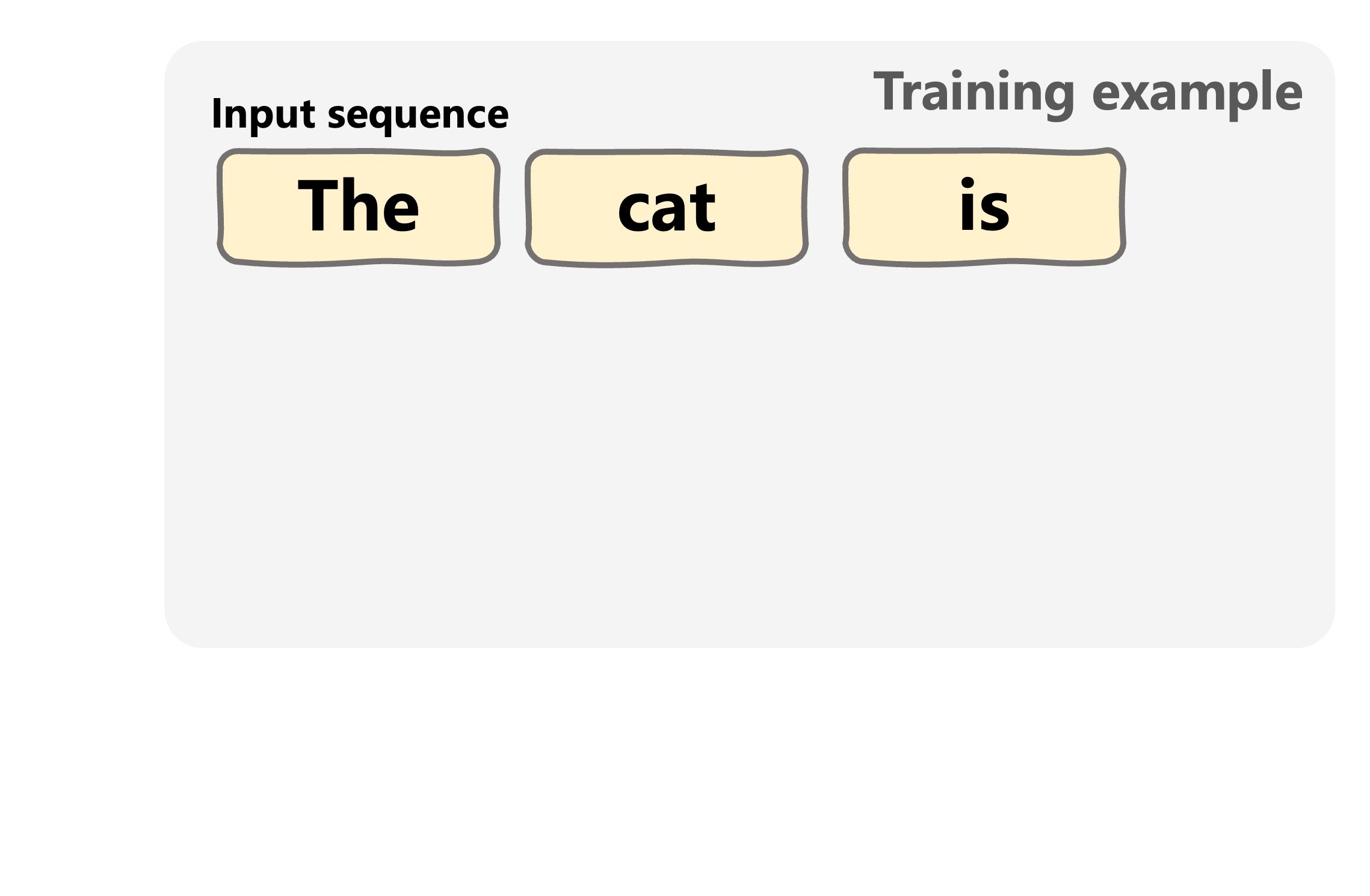
 

A training example for text generation LLMs

Introduction to LLMs in Python

How text generation LLM training works

Input + target (labels) pairs

  • Input sequences: a segment of the text, e.g. "the cat is" from "the cat is sleeping on the mat"
  • Target sequences: tokens shifted one position to the left, e.g. "cat is sleeping"
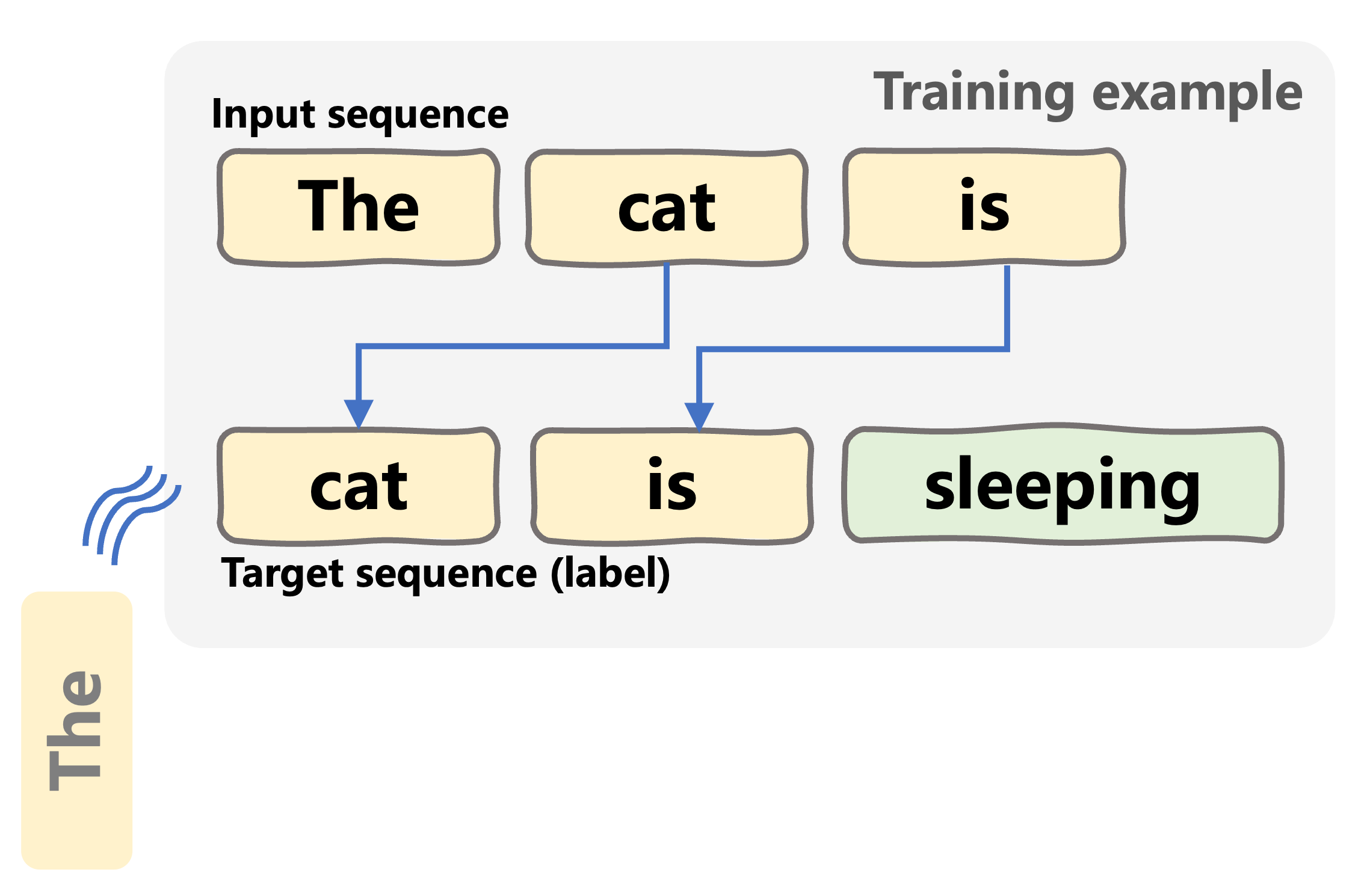
A training example for text generation LLMs

Introduction to LLMs in Python

Let's practice!

Introduction to LLMs in Python

Preparing Video For Download...